
Who Can Register on Spurbets in Kenya?
You can register on Spurbets if you are 18 or older and have a phone number that supports M-Pesa. Spurbets operates in Kenya under BCLB licence BK0000687. The BCLB (Betting Control and Licensing Board) is the state body that licenses betting companies in Kenya.
| Requirement | Detail |
|---|---|
| Age | 18 years or older |
| Phone number | Active number with M-Pesa support |
| Documents at sign-up | Not required |
| Not required | |
| Currency | KES |
The M-Pesa requirement matters. All deposits and withdrawals go through Safaricom M-Pesa. The KSh 20 Welcome Stake is also available only to accounts with an M-Pesa supported number.
Spurbets Registration Step by Step
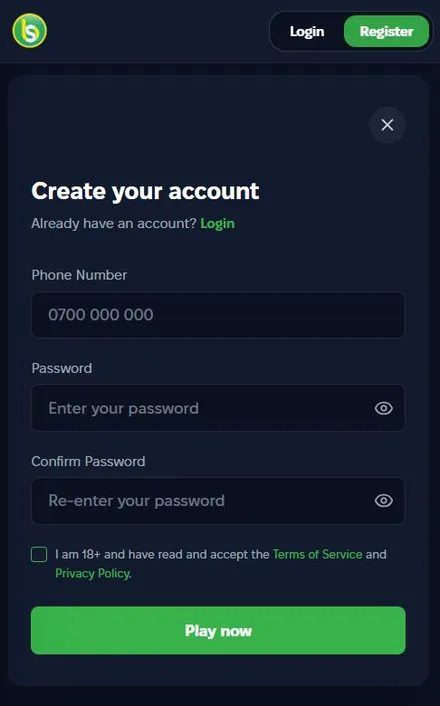
Registration on Spurbets uses one form with three fields and one checkbox. You enter your phone number, create a password, tick the 18+ box and press Play now.
The form looks the same on a computer, on a phone and in the Android app. The steps below follow the order of the fields in the form.
Opening the Registration Form
To open the registration form, click the green Register button in the top right corner of spurbets.com. A window titled "Create your account" opens on top of the page.
The Register button sits next to the Login button in a dark rounded frame. It appears on every page of the site. Under the form title, there is a "Already have an account? Login" line. Use it if you already have an account.
Entering Your Phone Number and Password
In the first field, you enter your phone number. In the next two fields, you create a password and type it again. Both password entries must match.
- Type your number in the Phone Number field. The placeholder shows the format 0700 000 000.
- Enter a password in the Password field.
- Repeat the same password in the Confirm Password field.
Each password field has an eye icon on the right. Tap it to see the characters you typed. This helps you avoid a mismatch between the two fields. Use a password that you do not use for M-Pesa or email.
Confirming Your Age and Accepting the Terms
The last step is a checkbox. By ticking it, you confirm that you are 18 or older. You also accept the Spurbets Terms of Service and Privacy Policy. Without the tick, the account will not be created.
The checkbox sits under the password fields, and the "Terms of Service" and "Privacy Policy" links in its text are green. Open them before you tick the box. They describe the account rules and how Spurbets handles your data. After that, press the green Play now button at the bottom of the form.
Spurbets Registration on Mobile Devices
On mobile, you can register in two ways: in the Android app or on the mobile website. The form and the account are the same in both cases.
The Android app comes as an APK file from spurbets.com. iPhone users register through Safari, because Spurbets has no iOS app.
Registering in the Spurbets App for Android
To register in the Android app, first install the Spurbets APK from the Download App button on spurbets.com. Then open the app and tap Register.
- Open spurbets.com in Chrome and tap Download App in the side menu.
- Install the APK. Allow installation from unknown sources when Android asks.
- Open the app and tap Register.
- Fill in your phone number and password, tick the 18+ box and tap Play now.
An APK (Android Package Kit) is the installation file for Android apps outside Google Play. Download it only from spurbets.com.
Registering Through the Mobile Website on iPhone
On an iPhone, open spurbets.com in Safari and tap Register. The form is the same as in the app.
After registration, add a shortcut to your home screen. Tap Share, then Add to Home Screen. The shortcut opens Spurbets in one tap.
Account Verification After Registration
Account verification is the step where Spurbets confirms that your account belongs to you. Spurbets requires it before your first withdrawal. Withdrawals go only to the M-Pesa number registered on your account.
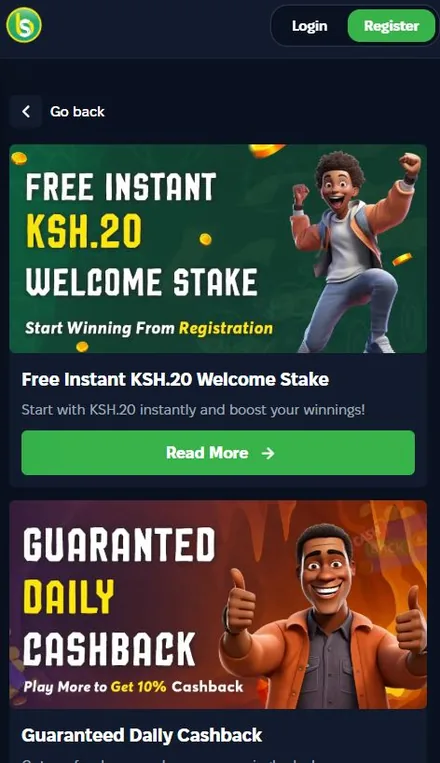
Verification affects withdrawals only. You can play without it. After registration, open your profile and check your wallet balance. The KSh 20 Welcome Stake should already be there. You can use it on crash games, casino games, virtuals and roulette.
| Action | Available before verification | Available after verification |
|---|---|---|
| Use the KSh 20 Welcome Stake | Yes | Yes |
| Deposit through M-Pesa | Yes | Yes |
| Withdraw winnings | No | Yes |
To avoid delays, register with the M-Pesa number you plan to use for withdrawals.
First Deposit After Registration
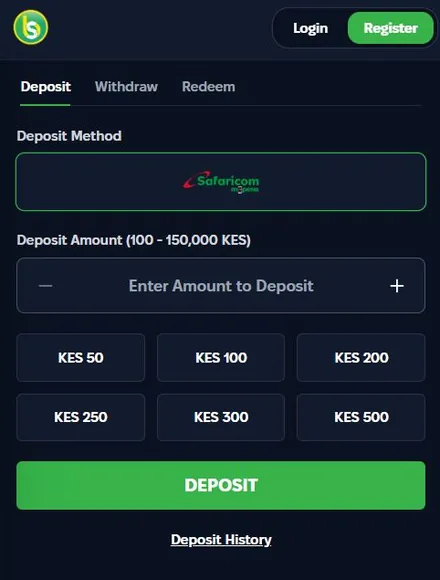
Your first deposit on Spurbets goes through M-Pesa in the Deposit tab of your wallet. The minimum is KES 100 and the maximum is KES 150,000 per transaction.
The wallet has three tabs: Deposit, Withdraw and Redeem. M-Pesa is the only payment method, so its logo is already selected on the Deposit tab.
How to Make Your First M-Pesa Deposit?
To make your first deposit, open the Deposit tab, choose an amount and confirm the M-Pesa request on your phone with your PIN.
- Log in and open the wallet.
- Select the Deposit tab.
- Enter an amount or tap a quick button.
- Press the green DEPOSIT button.
- Enter your M-Pesa PIN in the prompt on your phone.
After the payment, check Deposit History under the button to confirm that it went through. Your first deposit also starts the 10% daily cashback on lost bets.
Minimum and Maximum Deposit Amounts
A Spurbets deposit can be from KES 100 to KES 150,000 per transaction. The amount field shows this range in its label.
| Parameter | Amount |
|---|---|
| Minimum deposit | KES 100 |
| Maximum deposit | KES 150,000 |
| Quick buttons | KES 50, 100, 200, 250, 300, 500 |
The quick buttons include KES 50. This is below the stated minimum of KES 100. Choose 100 or more for your first deposit.
Common Registration Problems and Solutions
Most registration errors on Spurbets come from the phone number format, the password fields or the unticked checkbox. Each one is easy to fix.
| Problem | Cause | Solution |
|---|---|---|
| Play now does nothing | The 18+ box is not ticked | Tick the checkbox under the passwords |
| "Passwords do not match" | Different text in the two fields | Use the eye icon to compare them |
| Number not accepted | Wrong format or extra spaces | Enter the number as 0700 000 000 |
| Number already registered | You already have an account | Use Login or Forgot Password |
| No KSh 20 in balance | Number does not support M-Pesa | Contact support |
If none of these solutions help, call support at 0720006699. You can also write to [email protected]. Include your phone number and a screenshot of the error.
Frequently Asked Questions
Is Spurbets Registration Free?
Yes. Registration costs nothing, and you get KSh 20 in your balance after sign-up.
Which Phone Number Do I Need to Register?
You need an active phone number with M-Pesa support. All Spurbets payments go through M-Pesa.
How Long Does Spurbets Registration Take?
The form has three fields and one checkbox. Most players finish it in about a minute.
Do I Need to Deposit to Get the KSh 20 Welcome Stake?
No. Spurbets adds the KSh 20 to your balance right after registration, without a deposit.
Can I Register Two Accounts on Spurbets?
No. Each account is tied to one phone number, and Spurbets may withhold winnings from accounts that abuse promotions.
Who Can I Contact If Registration Fails?
Call Spurbets support at 0720006699 or write to [email protected]. Support works 24/7.