
What You Need for Spurbets Login
To log in to Spurbets, you need the phone number you used at registration and your account password. Nothing else is required.
| Login detail | Requirement |
|---|---|
| Phone number | The number you registered with, in the format 0700 000 000 |
| Password | The password you created at sign-up |
| Not used for login | |
| Device | Computer, Android phone or iPhone |
| Internet | Stable mobile data or Wi-Fi |
The phone number also serves as your M-Pesa wallet number. Spurbets sends withdrawals to it. If you change your SIM card, keep the same number. Otherwise you can lose access to both the login and your payouts.
Spurbets Login Step by Step
Logging in to Spurbets takes three steps. You open the login form, enter your phone number and password, and press Play now.
The process is the same on the desktop site, the mobile site and the Android app. Each step is described in detail below.
Opening the Login Form
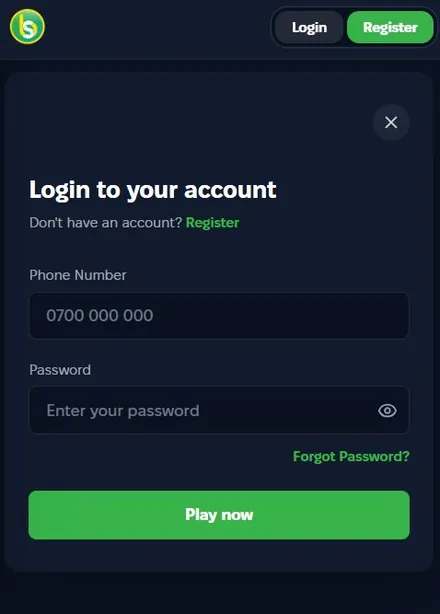
To open the login form, click the Login button in the top right corner of spurbets.com. A window titled "Login to your account" appears on top of the page.
The Login button sits next to the green Register button in a dark rounded frame. It appears on every page, including the game lobbies and the Promotions page. Under the form title, there is a "Don't have an account? Register" line. It switches you to the sign-up form if you do not have an account yet.
Entering Your Phone Number and Password
In the first field, you enter your registered phone number. In the second field, you enter your password.
- Type your phone number in the Phone Number field, following the 0700 000 000 placeholder.
- Type your password in the Password field.
- Tap the eye icon on the right side of the field to check what you typed.
The eye icon helps you avoid most password errors. Many failed logins happen because the phone keyboard capitalized the first letter or added a space after the last character.
Accessing Your Account With the Play Now Button
After you fill in both fields, press the green Play now button at the bottom of the form. The form closes and the page loads with your account.
In the header, the Login and Register buttons disappear after a successful login. Your account and balance appear in their place. If the form stays open, check the error message under the fields. The table in the problems section below lists the usual causes.
Spurbets Login on Mobile Devices
On Android, you can log in through the Spurbets app or the mobile website. On an iPhone, you log in only through the mobile website in Safari. The login form and your account are the same on every device.
The Android app is installed from an APK file. An APK (Android Package Kit) is the installation file for Android apps outside Google Play. You get it from the Download App button in the side menu of spurbets.com.
| Device | Login method | Notes |
|---|---|---|
| Android phone | Spurbets APK or Chrome | Download the APK only from spurbets.com |
| iPhone | Safari | No iOS app; add a home screen shortcut |
| Computer | Any browser | Login button in the top right corner |
On an iPhone, tap Share, then Add to Home Screen. The shortcut opens the Spurbets site in one tap. You do not have to type the address each time. If you switch between devices, your balance and bonuses stay the same, because they are stored on your account.
Spurbets Password Recovery
If you forget your password, use the Forgot Password link in the login form. The reset works through your registered phone number.
The link appears in green under the Password field on the right. It is the only self-service way to restore access. If you no longer have the registered phone number, contact support instead.
How to Use the Forgot Password Link?
To use the Forgot Password link, open the login form and tap the link. Then enter the phone number linked to your account and follow the instructions on screen.
- Click Login in the top right corner.
- Tap Forgot Password under the Password field.
- Enter your registered phone number.
- Follow the confirmation instructions sent to your number.
Keep your phone nearby during the reset. The confirmation goes to the number on your account, not to an email address.
Setting a New Password for Your Account
After you confirm your number, create a new password and log in with it. Choose a password that you have not used on Spurbets or anywhere else before.
| Good password practice | Example of what to avoid |
|---|---|
| At least 8 characters | Short codes like 1234 |
| Letters mixed with digits | Your phone number or birth year |
| Different from your M-Pesa PIN | The same PIN you use for payments |
After the reset, log in once to make sure the new password works. Then save it in a password manager or another safe place.
Account Features Available After Login
After you log in, you get access to your balance, the M-Pesa wallet, the promotions and all game sections. You can browse games without logging in. To place a bet, you have to be logged in.
The left menu shows all sections: Popular, New Games, Crash Games, Slots, Casino, Sports, Jackpots, Virtuals, Roulette, Promotions and Live Support. Your balance appears in the header.
Balance and KSh 20 Welcome Stake
Your first login after registration shows the KSh 20 Welcome Stake in your balance. Spurbets adds it automatically. You do not need to make a deposit.
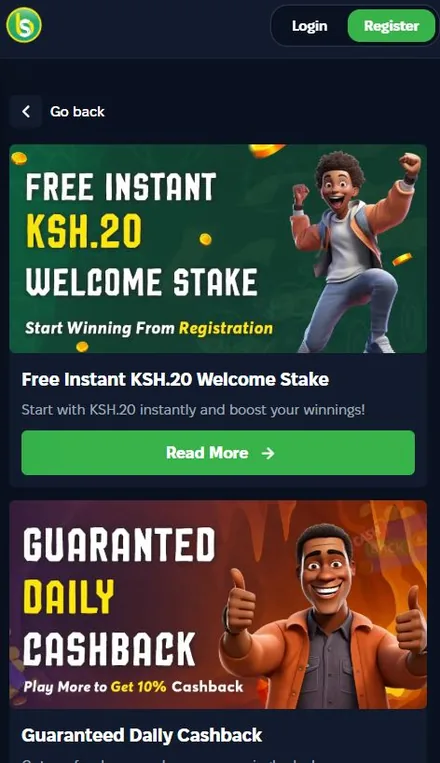
You can use the KSh 20 on crash games, casino games, virtuals and roulette. To check that it arrived, open your profile and look at the wallet balance. The offer applies only to accounts registered with an M-Pesa supported number.
M-Pesa Deposits and Withdrawals
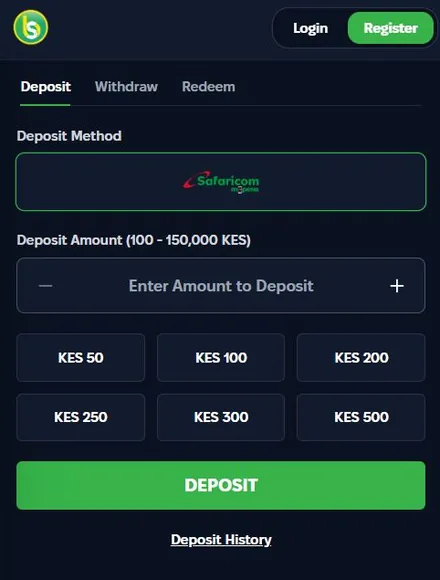
After login, the wallet lets you deposit and withdraw through Safaricom M-Pesa. It has three tabs: Deposit, Withdraw and Redeem.
| Wallet tab | What it does | Limits |
|---|---|---|
| Deposit | Top up through M-Pesa | KES 100 to KES 150,000 |
| Withdraw | Payout to your registered number | From KES 100 |
| Redeem | Enter a voucher or promo code | Depends on the code |
The Withdraw tab has Min, 25%, 50% and Max buttons. Your available balance appears under them. Withdrawals require a verified account.
Promotions, Games and Sports Betting
A logged-in account can take part in every Spurbets promotion. It can also play all games and bet on sports.
- 10% daily cashback on lost bets, credited automatically
- KSh 50 for each friend who registers through your referral link, plus 10% of their deposits
- Weekly tournaments with KSh 1,000,000 on Crash Royale and KSh 4,000,000 on JetX
- KSh 100,000 in daily unwagered Aviator freebets
- Aviator Challenges with cash, freebet and merchandise prizes
Unwagered means you can withdraw winnings from a freebet without betting them again. The sportsbook covers football, basketball, tennis, ice hockey, volleyball and boxing, with live betting during matches.
Common Login Problems and Solutions
Most Spurbets login problems come from a wrong password or a mistyped number. A few come from the connection. Each one has a clear fix.
| Problem | Cause | Solution |
|---|---|---|
| "Incorrect password" | Typo or auto-capitalized first letter | Use the eye icon, then Forgot Password |
| Account not found | Number differs from the registered one | Enter the exact number you used at sign-up |
| Form does not respond | Weak or expired data bundle | Check your bundle or switch to Wi-Fi |
| App does not open | Outdated or damaged APK | Download the latest APK from spurbets.com |
| Lost Safaricom line | No access to the registered number | Restore the line with Safaricom, then contact support |
If you see the login form again after you press Play now, clear your browser cache and try again. If that does not help, contact support.
Spurbets Account Security Tips
Your Spurbets account holds real money and is tied to your M-Pesa number. A few simple rules protect it from other people.
- Use a password that is different from your M-Pesa PIN.
- Do not share your password through SMS, WhatsApp or Telegram.
- Log out after playing on a shared phone or a cyber café computer.
- Download the APK only from spurbets.com.
- Ignore SMS messages that ask for your password or PIN.
Spurbets support will not ask for your password. Any message that asks for it is not from Spurbets. Protect your Safaricom line as well. Whoever controls the number can reset your password and receive your withdrawals.
Frequently Asked Questions
Can I Log In to Spurbets With an Email Address?
No. The Spurbets login form accepts only a phone number and a password.
Which Phone Number Do I Use for Spurbets Login?
Use the same phone number you registered with. It is also your M-Pesa number for payments.
Is the Login the Same in the App and on the Website?
Yes. The Android app, the mobile site and the desktop site use the same account and the same details.
How Do I Reset My Spurbets Password?
Tap Forgot Password in the login form and enter your registered number. Then follow the instructions to set a new password.
Why Can I Not Log In to My Spurbets Account?
The usual causes are a wrong password, a different phone number or a weak internet connection. Check them one by one before you contact support.
Who Can I Contact If Login Fails?
Call Spurbets support at 0720006699 or email [email protected]. Support works 24/7.