
What the Spurbets App Is and Which Devices It Supports
The Spurbets app is the Android version of the Spurbets casino and sportsbook. It connects to the same account as the website. Android phones get it as an APK. iPhones use the mobile site in Safari.
An APK (Android Package Kit) is the installation file for an Android app. You need it for any app that is not listed on Google Play. Google Play does not accept many real-money betting apps, so Spurbets distributes its app through its own website.
| Device | Access method | Where to get it |
|---|---|---|
| Android phone | Spurbets APK | Download App button on spurbets.com |
| iPhone | Mobile website | spurbets.com in Safari |
| Computer | Desktop website | spurbets.com in any browser |
Your balance, bonuses and bet history are stored on your account, not on the phone. If you switch from the app to the website, nothing gets lost.
Spurbets APK Download for Android
You download the Spurbets APK through the Download App button on spurbets.com. Then you allow your browser to install unknown apps. The whole process takes a few steps.
On the desktop site, the Download App button sits at the bottom of the left menu. The banner next to it shows a hand holding a phone with game icons on the screen. On a phone, the same button appears in the side menu.
- Open spurbets.com in Chrome on your Android phone.
- Open the side menu and tap Download App.
- Wait for the file to download, then open it from the notification or the Downloads folder.
- When Android blocks the install, tap Settings and turn on "Allow from this source" for Chrome.
- Go back and tap Install.
- Open the Spurbets icon on your home screen.
Android may also show a Google Play Protect warning, because the app comes from outside Google Play. Download the APK only from spurbets.com. Files from Telegram groups or third-party sites can be modified.
Spurbets on iPhone Through the Mobile Website
Spurbets has no app for iPhone. You play through the mobile website in Safari. It has the same games, promotions and M-Pesa wallet as the Android app.
To get one-tap access, you can add a shortcut to your home screen:
- Open spurbets.com in Safari.
- Tap the Share icon at the bottom of the screen.
- Select Add to Home Screen.
- Tap Add.
The shortcut opens the site with the same layout as the app: green Login and Register buttons on top and a dark background. You do not need to install anything. Updates also appear automatically, because the site always loads its latest version.
Registration and Login in the Spurbets App
The app uses the same account as the website. If you already have an account, just log in with your phone number and password. If you are new, you can register directly in the app.
How to Create an Account in the App?
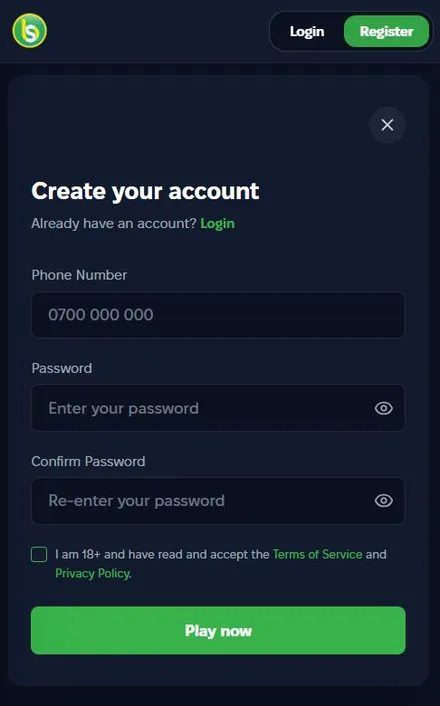
You create an account in the Spurbets app with an M-Pesa supported phone number and a password. Tap Register, fill in the form and confirm that you are 18 or older.
- Tap the green Register button in the top right corner.
- Enter your phone number in the format 0700 000 000.
- Enter a password and type it again in Confirm Password.
- Tick the box for 18+ and the Terms of Service.
- Tap Play now.
After registration, Spurbets adds a free KSh 20 Welcome Stake to your balance. Check your wallet balance to confirm that the money has arrived.
Login and Password Recovery in the App
You log in to the app with your phone number and password. If you forget the password, use the Forgot Password link below the password field.
The login form is titled "Login to your account". It has an eye icon in the password field, so you can check what you typed. The Forgot Password link is green and sits on the right side under the field.
| Problem | Solution |
|---|---|
| Wrong password | Tap the eye icon, then use Forgot Password |
| Account not found | Enter the number you registered with |
| Form does not load | Check your mobile data and reopen the app |
M-Pesa Payments in the Spurbets App
All payments in the Spurbets app go through Safaricom M-Pesa. The wallet has three tabs: Deposit, Withdraw and Redeem. The Redeem tab is for voucher or promo codes.
M-Pesa is already selected as the method on both payment tabs. There are no cards or bank transfers. Each tab has its own history link, Deposit History or Withdraw History.
How to Make a Deposit in the App?
To deposit in the app, open the Deposit tab, enter an amount from KES 100 to KES 150,000 and confirm the M-Pesa request with your PIN.
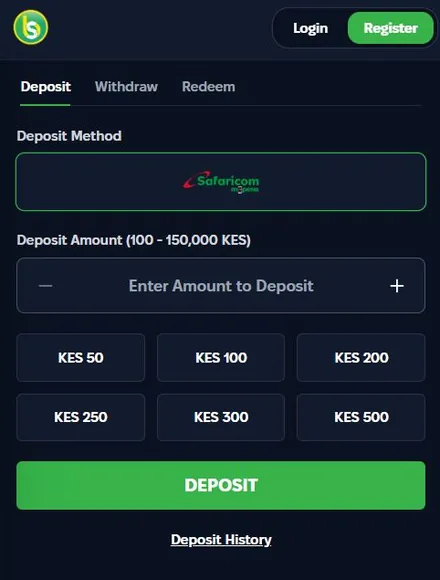
- Open the wallet and select Deposit.
- Enter an amount or tap a quick button.
- Tap DEPOSIT.
- Confirm the payment on your phone with your M-Pesa PIN.
The quick buttons show KES 50, 100, 200, 250, 300 and 500. The KES 50 button is below the stated minimum of KES 100. Choose 100 or more so the deposit goes through.
Withdrawal to M-Pesa From the App
Withdrawals in the app go to the M-Pesa number registered on your account. The minimum is KES 100. Your account must be verified first.
The Withdraw tab has four buttons: Min, 25%, 50% and Max. The available balance appears under them. The minimum amount is shown in red next to the amount field.
- Open the Withdraw tab.
- Enter an amount or use one of the buttons.
- Tap WITHDRAW.
- Wait for the M-Pesa confirmation SMS.
Spurbets does not publish an exact withdrawal time. You can track the status in Withdraw History.
Games and Sports Betting in the Spurbets App
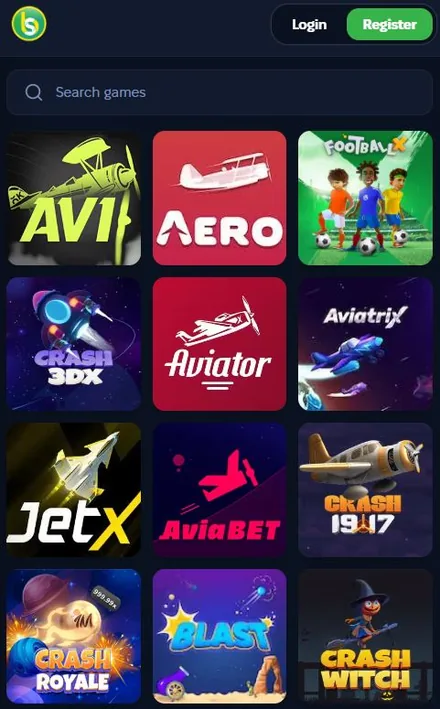
The app has the same sections as the website: crash games, slots, casino, live casino, jackpots, virtuals, roulette and sports. A search bar at the top helps you find a game by name.
Aviator and Other Crash Games
Aviator is the first game in the Top 6 games in Kenya list on the Spurbets homepage. In a crash game, you place a bet before the round. A multiplier then grows, and you must cash out before the round ends.
Spribe developed Aviator, and its RTP is 97%. RTP (return to player) is the share of all bets that a game pays back over a long period. The crash lobby in the app includes these titles:
- Aviator
- JetX
- Aviatrix
- Crash 1917
- Crash Royale
- FootballX
- Crash 3DX and Crash Witch
Aviator players share KSh 100,000 in daily freebets. A freebet is a bet you place without spending your balance. Crash Royale and JetX also have weekly tournaments with a total prize fund of KSh 5,000,000.
Slots and Live Casino Tables
The slots section includes Pragmatic Play titles such as Sweet Bonanza, The Dog House and Sugar Rush Xmas. The live casino streams Blackjack, Baccarat and Andar Bahar with real dealers.
| Section | Examples in the app |
|---|---|
| Slots | Sweet Bonanza, The Dog House Megaways, Candy Stars, Rico Tiger, Honey Money |
| Live casino | Speed Blackjack, Baccarat, Andar Bahar, Richie Wheel, Keno |
Live tables stream video, so they use more mobile data than slots. Play them on Wi-Fi or a large data bundle.
Sportsbook and Live Betting
The app sportsbook covers football, basketball, tennis, ice hockey, volleyball and boxing. You can bet before a match or during it.
Odds are shown in decimal format. To work out a payout, you multiply the stake by the odds. For example, a KSh 100 bet at odds of 1.38 returns KSh 138. Live matches show the score, the timer and a green counter of extra markets. The filters at the top are Live, Top Matches, Upcoming and Favorites.
Spurbets App Updates and Common Problems
To update the Spurbets app, download the latest APK from spurbets.com and install it over the old version. Your account stays the same, because all your data is stored on the Spurbets servers.
Most problems with the app come from Android settings or the connection.
| Problem | Cause | Solution |
|---|---|---|
| Install blocked | Unknown apps not allowed | Turn on the permission for your browser |
| "App not installed" | Not enough storage or a damaged file | Free up space and download the APK again |
| Games load slowly | Weak network | Switch to Wi-Fi or 4G |
| Login error | Wrong number or password | Use Forgot Password |
If the problem continues, call Spurbets support at 0720006699 or write to [email protected].
Frequently Asked Questions
Is the Spurbets App Free to Download?
Yes. You download the Spurbets APK from spurbets.com for free.
Is the Spurbets App Available on Google Play?
No. The APK is available only through the Download App button on spurbets.com.
Can I Use Spurbets on an iPhone?
Yes. iPhone users play through the mobile website in Safari, because there is no iOS app.
Do I Need a New Account for the App?
No. You log in with the same phone number and password you use on the website.
Is the Spurbets APK Safe to Install?
Yes, if you download it from spurbets.com. Spurbets holds BCLB licence BK0000687.
Can I Use the KSh 20 Welcome Stake in the App?
Yes. The stake goes to your account balance, so you can use it in the app on crash games, casino games, virtuals and roulette.